Showing posts with label major. Show all posts

Thursday, 4 June 2020

Drawing The Line - Major Project Submission


Render Example:


The Concept:

The concept of my major project film follows themes of self identity and gender. I wanted to use this platform to express my own journey with self identity; how you shouldn’t change for other people, and that happiness comes from being yourself. The story follows an artist drawing out a new faceless character, the design of which I wanted to keep simple, but challenge myself with still making it an emotional and expressive being. We follow the artist and creator trying to change the way the character ‘Sketch’, outwardly appears, cycling through three alterations of appearance. These are symbolic of hyper masculine and feminine features, only making ‘Sketch’ angry and upset at being forced to change to suit the artists aesthetic desires. As the story continues, the sentient ‘Sketch’ attempts to redraw themselves, conveying that they were happy with who they were to begin with, and refusing to change just to simply fit into the physical gender binary that the artist is trying to box them into.


Goals: 


My goals surrounding the project focussed on telling a coherent story that was able to be understood without spoon-feeding the audience the plot, using only music and visual animation to evoke the themes and events. At the heart of the film, I wanted to ensure that the story was solid and that the viewer could comprehend the themes; understanding my story without having to rely on spoken word. In terms of technical ability, my goals were to get the 3D animation completed, as well as including samples of 2D effects in softwares outside of Maya.


Outcome: 


Having to complete my final major project during the Covid-19 pandemic has proved to alter the expected outcomes. We were given priorities to follow which included the ‘Making-Of’ booklet as well as the animation itself. 

Within these circumstances, the expected outcome I set for myself was to create a professional ‘Making-Of’ document that raised my level of professionalism and moved on from the sketchbook theme I previously designed during the Minor project. The animation itself I wanted to have completed and have the Toon line rendered, but not having the facilities to do this whilst in lock down presented a series of time consuming issues. I set myself the expectation of also having a set of rendered/ play blasted turn-arounds for all the different forms of the main character.


Minor Project Submission:


Premise Project Submission:


Friday, 1 May 2020

Toon Shader Experiments

I've been working on the Toonshader a little bit and although it doesn't look perfect, I've fixed the issue of the shader only outlining the silhouette of Sketch, which lost lots of definition. I also played around with a few different texturing methods and I'm still not 100% happy with it, but it'll work for now until I can figure out something better.

I tried to apply the same texture of the book to sketch, with the toon shader outline. I wanted to try this out to see how sketch looked with a bit more definition. With this method, the shadows cast naturally from the hand onto Sketch. However, I really don't like how the added definition looks. It makes Sketch look too 3D and almost clay-like, rather than looking like a 2D drawing.
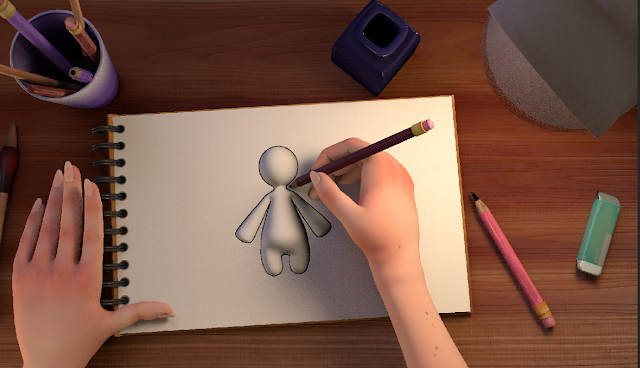
Experiment 1 with Book Texture
Next, I tried the original method I used in the minor project which was chromakeying.  I wanted to see how this would look now that my scene is properly set up. This is how it looks:
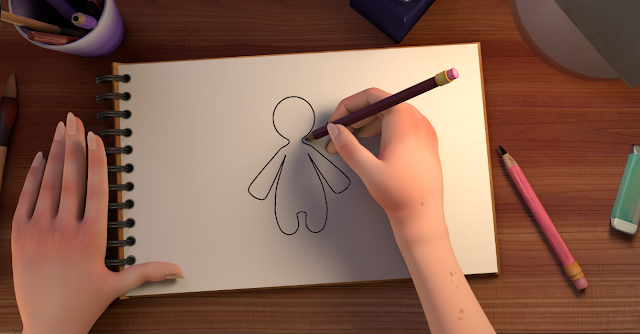
Experiment 2 Chromakey Test

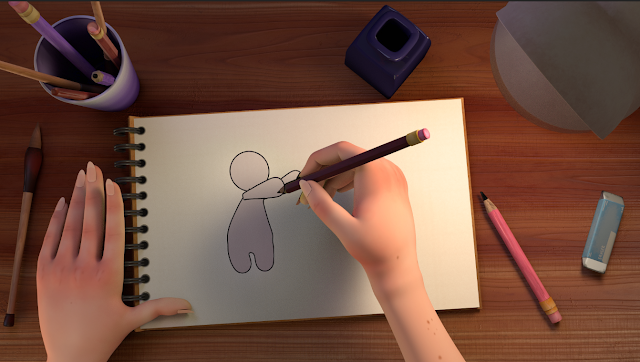
This is my favourite method so far but also quite complex and can be a little overwhelming. With this method, I would have to render Sketch and the rest of the scene separately and overlay them. This might get a little complicated when Sketch interacts with other objects but my way around this at the moment is to duplicate the scene files, and when I come around the render them, I will delete everything but Sketch so the Render will look something like this: 

And when I render the Scene and the Artist, I will remove Sketch and only render the rest of the scene which will look like this:


Something that I had to figure out with this process was that I lost a lot of definition as the Toon outline was only lining the silhouette of Sketch. I fixed this by turning off ID difference, decreasing the Angle Threshold, and changing normal types to smoothed normal in the Attribute Editor. I don't know how this looks in an animated sequence though, So I'll have to try and render a small section of my animation to see if this actually works. I also don't like how Sketch's hands just seem to faze through the pencil and the Artist's hands, I tried fixing this but haven't come up with a solution yet.
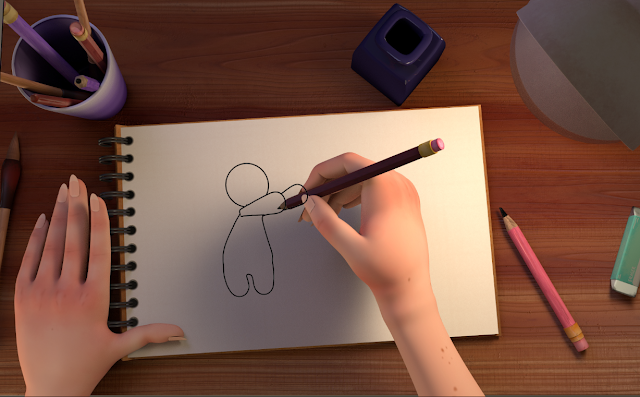
Experiment 2 Chromakey with Better Definition

To try and solve this problem I also tried Rendering Sketch and the setup/Artist in the same scene, but I realized that the Toonshader is reflecting a green hue onto everything, which is distorting the colours, so when I overlay it on top of the Render of the scene without Sketch, the colours don't match up.
Chromakey test with Green Hue
Scene Render before Chromakeying

This method looks like Sketch is actually interacting with the objects and not just fazing through them, but the green hue from the toon shader changes the colour of the scene, if I could find a way to stop the Toon Shader from reflecting onto other objects in the scene then that might fix it but I can't seem to find any settings that will do that.

Friday, 24 April 2020

Major - Complete Scene Set up

I've gotten my scene to a place where I'm happy with how to looks. Below is a render of what my scene looks like at the moment. I'm currently setting up some controls and locators for the book and the pencil and will hopefully be able to show some playblasts of animation in the next few days. I haven't finished the dynamic rigging that my scene needs at the moment but I'd like to prioritize animation right now.


Saturday, 28 March 2020

Major - Masculine Sketch Skinning and Rigging Complete

I've completed the rig and skinning for Masculine Sketch, meaning that all of my characters are now rigged. I'm now going to focus on texturing and animation now as these are currently the priorities in my project. I'll be uploading my schedule and shot list as well as I've lost quite a lot of time on my project, and would like to get back on track asap.


Friday, 21 February 2020

Major - Squiggly Sketch Re-Binding

As I lost the skinning on Squiggly Sketch during the rigging process, I had to redo the binding, weight grouping and blending process. I now only have one character left to rig, but I'm going to start focusing on animating what I can with what I've got so far and animating is the priority right now.


Wednesday, 19 February 2020

Major - Squiggly Sketch Rig

I've finished rigging the Squiggly Sketch model. I've somehow deleted the skinning I had done previously so I'll have to redo that which is a bit annoying, but I'm definitely getting used to the skinning and rigging process. I kept the dummy control for my character rig as the length of the pelvis joint on my character is a lot longer than the one in the tutorial and if I remove it i'll be limiting a lot of movement in the spine.


Sunday, 9 February 2020

Major - Painting and Blending the weights for Squiggly Sketch

With the Minor project having come to a close, I've started to work on my Major project. Right now, I'm trying to finish up anything left incomplete from the minor project. My priority right now is to finish rigging the two remaining models. I've painted and blended the weights for Squiggly Sketch, and will now move on to rigging them. I'll be posting an outline of my project after I have a tutorial with Alan to discuss my feedback on my minor project, and how to progress further.