Showing posts with label digitaldrawing. Show all posts

Monday, 9 October 2017

Character Design Studies

Since my assigned character was a Superhero or Super Villian, I had to take on a more 'adjacent approach' when finding references to study from as it was a little difficult finding real-life superheroes to use as a reference. I've chosen to create a Villain.  The Conceit of my character is Psychedelic Album covers, and the trait is Vain. The world is 1960s London. Based on this information I found images of my favorite style icons from the 60s such as; Eartha Kitt, Twiggy, and Diahann Carrol. I also drew a study of one of my favorite icons; Grace Jones, I love their bold, androgynous style and image. I want my character to look extremely powerful and intimidating.


I also drew a couple characters from 1960s comics such as; Rainbow Girl and Infectious Lass, I was a little lost in finding real-life inspiration, so I wanted to study the 60s comic book style, as this is a style I would like to adopt in my own designs.


Friday, 14 October 2016

Flash Animation- Follow Through and Overlapping Actions

Using my cartoon bouncing ball as a base, I added more characteristic features to my animation. So far, I have only added legs, however this has already given the impression that the bouncing ball is a live creature, and not an object. Next I'll try adding a tail and arms. I'm feeling a little more confident in using Adobe Animate, although I'm still struggling a little with figuring the movement of different objects. 

Monday, 3 October 2016

Abstract Octavia Thumbnails

I created these quick thumbnail drawings by using the Lasso, Marque, and Brush tools. I used the City Octavia as my inspiration; "The spider-web city..."- pg.14 of Anthology.
I focused on the spider-web description of the city and drew a lot of thin lines covering the image to represent the spider-web. These are all abstract drawings, but they have inspired me in terms of thinking up of perspectives of the city that i hadn't thought of.

Image Creation Techniques WORK IN PROGRESS


This is a work in progress of my Octavia Thumbnail drawings.I have started looking at my rough thumbnail sketches and refining them a little more and taking into account how perspective and different tones can make the drawing look more 3d and communicate my ideas better to other people. This is just a work in progress, But I can already see the difference comparing these drawings to my previous thumbnail drawings.

Anastasia Thumbnail sketches


Digital Thumbnail Sketches


As an introduction to Photoshop as well as getting started with the Space and Environment project, I was asked to create 3 sets of thumbnail sketches based on Calvino's fantastical cities, using different Photoshop techniques and tools.


The first technique I used was the brush tool to create simple, sketchy line art. I think this technique is an efficient way of making very quick sketches that allow you to explore composition and shapes before you start putting a lot of effort into a drawing that you haven't planned properly. Although this style is messy, it's great for thumbnail sketches. These thumbnail sketches are based on the city Baucis.

"The slender stilts that rise from the ground at a great distance from one another and are lost above the clouds support the city. You climb them with ladders...Nothing of the city touches the ground except those long flamingo legs on which it rests and, when the days are sunny, a pierced, angular shadow falls on the foliage."
- Pg. 4 of Anthology

For these thumbnails I focused on the "Slender stilts" that support the city. I imagine them as long, spindly, old wooden stilts that are just about able to hold the city up above the clouds, so I drew them crooked messy to give them a little more character and the impression that they are only just holding up, and could possibly give way at any second.
The Second Technique I used was the Selection tools; Lasso, Marque, Transform.  I used the lasso tool to mark out random shapes and then colored to selection in with the brush tool. I think I need a little more practice with the lasso tool, or i need to look up a few tutorials as I don't think i'm using it to it's full potential. The results of using these tools gave me very clean lines compared to the sketchy line art technique I used In my previous thumbnails.

"In Esmeralda, city of water, a network of canals and a network of streets span and intersect each other. To go from one place to another you  have always the choice between land and boat: and since the shortest distance between two points in Esmeralda is not a straight line but a zigzag that ramifies in tortuous optional routes."
-Pg. 8 of Anthology

For these thumbnails I focused on the "zigzag" and "canals of water" that travel through the city. I imagine Esmeralda to be either a peaceful city filled with nature, or an extremely  busy city that only uses canals to travel, meaning that the city is swarming with complicated canal routes. I really Like the thumbnail on the top left. the zig zag shapes represent the canals. 


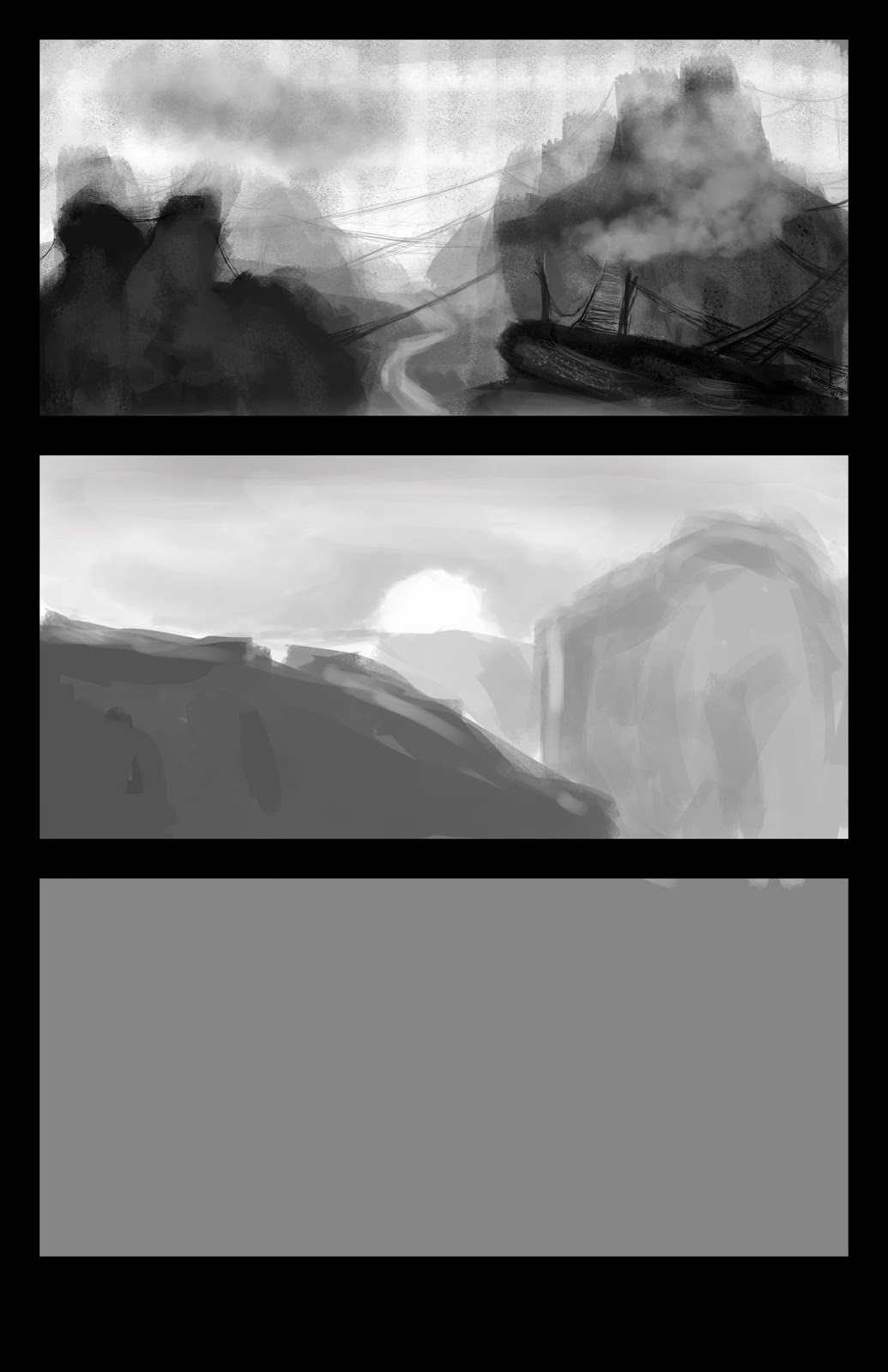
The third  Technique that I used was combining a variety of different paint brushes with the Lasso Tool. By using the lasso tool I could be very selective with which parts of the layer I was drawing on. I really liked the effect of using different brushes at different opacity settings to achieve a cloudy look to the drawing.

"The spider-web city...there's is a precipice between two steep mountains; the city is over the void, bound to the two crests with ropes and chains and catwalks. You walk on the little wooden ties, careful not to send your foot in the open spaces, or you cling to the hempen strands. Below there is nothing for hundreds and hundreds of feet: a few clouds glide past; farther down you can glimpse the chasm's bed."
-Octavia Pg.14 of Anthology


Friday, 30 September 2016

Monster Character Design Work in Progress

Scanned Rough Drawing

Colored drawing using Adobe Illustrator
For this design challenge I was asked to design a Monster inspired by the Characters from Monster's Inc University. I had to pick out of a cup pieces of paper that had random numbers that represented how many arms, legs, and eyes my monster would have. I chose 6 eyes, 3 arms, and one leg. It was really interesting thinking of how to incorporate these elements into my monster design, I have a few very rough thumbnail sketches that I will try to add to this post at a later date. After I had drawn out a rough sketch of my final design and scanned it onto my USB using a printer, I used Adobe Illustrator to draw the line art. I used the pen tool for this, and this was a technique that definitely took me a lot of time to get used to. I didn't use a tablet at all for this drawing, everything was drawn by mouse. It was really interesting exploring a digital drawing technique that doesn't involve using a graphics tablet. I also think that using this method gives you very clean results. I colored The drawing by using the live paint bucket tool and pen tool, for the highlights and shadows I adjusted the opacity and settings of the highlights and shadows layers. This process was frustrating at times because I don't think I fully understand it yet, but for a first try, i'm pretty impressed with myself.

 The reason why this post is currently a work in progress is because there are a few details I need to clean up, like the visible brush strokes on the glasses, and I also wanted to try adding a gradient effect to the monsters tail. 

Tuesday, 20 September 2016

Completed Black and White Still Life Study


This is my completed black and white still life study. I'm pleased with how quickly I've progressed in terms of using Photoshop to paint digitally. I noticed that after taking a break and coming back to this painting, I was a lot more confident in using different kinds of brushes and tools such as the mixer tool. I could improve this piece by paying more attention to the still life image as the proportions are a little off. I enjoyed seeing the painting become more realised and finished as I carried on drawing, and I think it will be interesting to see how my next still life study involving colour will turn out.

Monday, 19 September 2016

Photoshop Digital Painting W.I.P


15 minute drawing on Photoshop. This was my first time using Photoshop to paint and it was interesting figuring out the different controls and using different brushes and layers to create the right textures and shades. I have experience in using Coral Painter so I didn't struggle that much in using Photoshop to paint, surprisingly, I found Photoshop easier to pick up in terms of understanding the different controls. This is still only a work in progress and I will be working on this further as I'm not happy with this drawing so far, however I haven't been working on this piece for very long so I'm excited to carry on drawing and see how this digital painting turns out.